Showing posts with label hardware. Show all posts

Saturday, June 15, 2013

Three Weeks with the Helix: My Thoughts on Windows 8 and Hardware

A couple of months ago, my laptop's charger died, and I suddenly found myself in a computer crisis.  (At the time I thought it was the battery (again--this machine has killed 2 batteries so far), hence my frantic search for a new machine, but it turned out to only be the charger--it turns out I have access another one I can use in the meantime.)  I needed a dependable machine; one that was good for every-day tasks such as browsing, e-mail, documents, and of course blogging, but also good for programming and other tweaking I like to do.

I had been keeping my eye on the market for about a year, and so I decided that then was the time (even though I knew Haswell was just around the corner--silly me).  I was very interested in Windows 8's new touchscreen features.  I tested the beta builds of Windows 8 on my laptop, and I found them to be very fast and stable, but I determined that the "Modern" interface (a.k.a. "Metro") was pretty much useless without a touchscreen.

Nevertheless, touchscreen is the future of computing interfaces, but by the same token, keyboards and mice/trackpads are also the present state of computing interfaces in Windows.  I definitely needed both, without compromise.  The Microsoft Surface Pro was too inflexible as a laptop device--the "Touch" keyboard is worthless to me, and even with the "Type" keyboard, the screen is only supported at one angle, and then only when it's on a flat, stable surface.  No, thank you.

I really liked what I saw coming out of Lenovo lately.  The Lenovo Yoga 13 looked pretty awesome (I had tried it at the store), and the Helix looked amazing, but it wasn't out in the U.S. yet--or was it?  It wasn't for sale on Lenovo's website, but I was able to find it from small sellers at Amazon and elsewhere.

After looking around for the best price at a somewhat reputable retailer (as far as I could tell) I found a site with a coupon code that was out of state (no tax), and bought it.

I was very happy with the touchscreen interface, for the apps that were available.  I found the selection of touchscreen apps barely adequate, but that situation will improve with time and consumer adoption.  There were a few kids games that Shoshana in particular loved to play, and the tablet form factor (and tent mode, and stand mode) is a great feature for kids.

In daily use, switching between touchscreen input and keyboard/trackpad input was as natural as switching between mouse/trackpad and keyboard input on a 'traditional' machine: I was able to use whatever seemed appropriate and convenient to the task at hand.  I didn't find myself using trackpad gestures, since the screen itself was a more intuitive place.  Trackpad gestures will probably be more useful to someone with Windows 8 and no touchscreen (which I don't recommend).  Similarly, I completely ignored the "hot corners" functions of Windows 8, since those are built as a way for mouse users with no touchscreen to do tasks built for a touchscreen.

Keyboard replacement (left), and base unit (right)
To make a long story short regarding my ownership of the Helix, I was sent a unit with a French AZERTY keyboard dock.  I opened a support case with the retailer, and with Lenovo.  I was sent the QUERTY keyboard part, but with no way to open up the base unit and install it (without breaking anything), I had no choice but to simply send the keyboard back to the manufacturer, and send the Helix back to the retailer.

I was issued a full refund for my troubles, so I'm not out any money, and I have gained a lot of perspective on what I value in a computer.  Here are my notes from the Helix experience:
The detachable screen form factor was pretty awesome, though I did end up taking the base with me everywhere even if I wasn't using it.
  • "Stand mode" is great for using the touchscreen at an angle on the lap or a table.
  • In laptop mode it seemed top-heavy due to the "behind-the-glass" design, but this was never a real problem.
  • The 1080p screen was simply too small for the Desktop interface at 11 inches.  This is a fault of Windows 8, not the hardware.  DPI settings are simply ignored by too many apps.  The text was too small to read comfortably. The 13" Yoga is looking pretty good in that regard.
  • The stylus was nice to have, but with a trackpad not really necessary.
  • The Windows 8 Modern UI app ecosystem is lacking.  This may improve with time. BlueStacks is too cumbersome to really use for touchscreen apps.
  • Using the mouse buttons on the bottom corners of the rocking touchpad was wonky, and never worked the way I expected.
  • The function keys F1-F12 were toggled to their auxiliary functions by default. I had to hold the function key down to get them to work as themselves.
  • The function key was located where I expected the control key to be and vice versa.
One thing that surprised me was that I didn't like the pixel density.  I have pretty good eyes, and I have always sprung for the highest resolution displays that I can get on my laptops.  I have been very put off by all of the new computers these days with 1366x768 displays.  768 vertical pixels is equivalent to those 1024x768 displays we all had with Windows 95 on our 11" 3x4 monitors.  It's worthless for multitasking, or for reading text, and especially for editing code.  It simply will not do.

I was surprised, then, that 1920x1080 pixels was too small for me to find useful.  Yes, I could see everything, but I had to concentrate to actually read it one line at a time.  This also would not do.  So no longer can I simply say "increase the pixels"; I must find the right balance between screen size and pixel density.

To that end, here are some pixel density data points I have collected:

My Dell Inspiron E1505 has:
  • 1680x1050 at 15.4" 16x10 = 128.645 ppi
  • Equivalent size at 1080p 16x9 128.6 ppi would be 17.1"
Lenovo Yoga 13 has:
  • 1600x900 at 13.3" 16x9 = 138.0 ppi
  • Very similar to my E1505, and quite useable
Lenovo Helix has:
  • 1080p at 11.6" 16x9 = 189.9 ppi
  • Not useable
Dell Precision M4700 (encountered at work) has:
  • 1080p at 15.6" 16x9 = 141.2 ppi
  • Looked usable
The best pixel density per inch seems to be in the 140 range, not the 190 range.  If I want a 1080p screen, I'll need to go with something larger, like the 15.6".  If I want something smaller, I will need to sacrifice some screen real estate.  Suddenly the Yoga 13's screen resolution transforms from a disappointing spec to a sound product design decision.

I definitely like the Yoga 13, but I'm not sold on it.  My current machine is bulky, but it has suited my needs very well for over 6 years.  It's definitely on the way out, and has its problems:
  • Broken charger
  • Broken hinge 
  • Hot
  • If it gets jostled the wrong way, the screen goes dark and everything is unresponsive (ever since the hinge broke).
  • Battery life is down to about 40 minutes on a full charge.
  • Not to mention its 6-year-old specs.
...but I'm hoping it will hang on until I see what the new Haswell chips can do in a transformable laptop in the 15" range.  I don't want to feel like my new computer is a downgrade.  With the Helix's small screen, that was definitely the case, even with the increased pixel count.

Sunday, April 29, 2012

Rooting my Nook Simple Touch

Note: This post is mostly about my technical experience of rooting the Nook.  I'm planning to write a less technical post about actually having and using the device on my main blog sometime soon.

I recently got a Nook Simple Touch.  This device is running on Android 2.1 (Eclair) under the covers, and I wasted no time getting control of my device so that I could install my own apps and customize to my heart's content.
 First, I backed up the internal memory.  You should always back things up if you plan to mess with their innards in ways that could turn them into a brick.  In fact, that's exactly what I ended up doing.  Read on.

Here's a guide to backing up your Nook Simple Touch.

I ended up doing a Linux dd to write the nookie image to the MicroSD card, because I kept getting an error whenever I tried to do it from Windows 7 or Windows 8 preview, regardless of which tool I was using. 

Also of note:  the disk images produced by this backup method are 1.82 GB in size.  While you're not actively using the backup images, I recommend compressing them, since they're mostly empty space.  I was able to get the factory fresh image down to 237 MB by Zipping it up with 7-Zip.  I also tried the 7z format instead of ZIP, which got it down to 207 MB, but I just got 25 GB of free SkyDrive space to play with, and the compression took a lot longer to process.  As you add files to the Nook, the compressed size of the images will go up.

I'm going to say this again: BACK UP!  And back up your backup!

I had created my initial backup, and rooted it following this guide.  I had to track down my own copy of uRamdisk_rooted, since the link they provide is dead.  This method only gets you root, however; it doesn't install the Market or anything else, so this wasn't what I wanted. 

I then found this thread, which was exactly what I had been looking for.  I was at the step where it says to follow the on-screen instructions.  The instructions said to wait until the screen flashed black, remove the SD card, and reboot.  I did that, or at least, I did what I thought that meant.  It was really quick--too quick:  the screen immediately flashed black and back to white, and then it sat there for a while doing nothing.  This looked like a normal screen refresh, but was that it?  Spoiler: no. 

I had just bricked my shiny new Nook. 

Not to worry!  I had a backup.  I then proceeded to restore it to its factory-fresh state.  I booted the Nook to the nookie-flashed SD card, fired up Roadkil's Disk Image, and pointed it at the backup file and the Nook's drive, and clicked "Start".  All appeared to be going smoothly, until I realized that I was overwriting my only good backup with an image of a corrupted system!

Thankfully, that file was sitting in my Dropbox folder at the time, and had been there long enough for its 1.82 GB to have uploaded to the cloud.  As fast as I could, I moved the file out of my Dropbox folder, and then went online and restored the deleted file, and re-downloaded it.  I then copied it to my Linux box, and used that to copy the image back to the device using the dd command (since, as I mentioned, hitting "Start" with the correct settings in Windows only resulted in an error.).  (Actually, since my current Linux box only has USB 1.1, It was faster to copy the file to the media PC, boot that to a Linux LiveCD, and dd the image from that environment.)

After that, I re-initialized the device, updated its firmware from Barnes & Noble, and correctly followed the instructions to root it, creating several backup images along the way.  One annoying thing about creating backups is that in order to do so, you need to boot from the nookie-imaged SD card (which is different from the touchnooter image used to root it, and also different from the way the Nook sets up files on it during normal operation).  I only have three MicroSD cards: two of them are in Liz and my phones (and are therefore in use), and the remaining one is for the Nook.  There are no extras, so whenever I need to make a backup, I have to somehow preserve what's on the card (if it's valuable), flash it with the nookie image, create the backup, and then restore it to a semblance of its previous state.  I've considered getting another microSD card.  I've got my eye on a 32GB one for my phone, thus freeing up the current 8GB card and giving me lots more space for pictures, video, and music.  This has the disadvantage of being unnecessary in the strict sense, and possibly more trouble than its worth at the moment since I would need to wait for it to arrive, and so I'll still need to use the old method "this time".  That, and they keep getting cheaper, so I want to hold off.

Wednesday, March 09, 2011

Motorola Atrix 4G

Two days ago I ordered myself a Motorola Atrix 4G!  This is a big deal:  I've been wanting a smartphone, specifically an Android phone, for quite some time.

My contract isn't actually up.  Last February we renewed all four of the contracts on our family plan at the same time.  This, I realize, was a mistake, because while it increases flexibility in that it makes it easier to leave the carrier (two years later when all of the contracts are up), it actually reduces flexibility in that if you have trouble with one of the phones (as it did with my dad's), you are left without the option to upgrade out of time.

Since my current phone is a "dumb" phone, the early termination fee (when I cancel the contract) is not so bad.  With 11 months left on the contract, it will be $98.

The way I'm going about this is to order the Atrix on a new line on our family plan.  When it arrives and I activate it, I will attempt to get AT&T to exchange the numbers associated with the contracts so that my old contract has the new number, and the new contract, with the Atrix, has my old number.  I estimate that I have a 20% chance of succeeding.

I would like to keep my number, so if that doesn't work, I will simply port the old number to Google Voice.  I currently use Google Voice for voicemail and for sending text messages from a computer, and I wouldn't mind it a bit if by default, everything went through it, especially text messages, since I would prefer not to pay for them.  If I port the number, text messages sent to it won't be text messages anymore: they will be data.  I have always hated that the carriers charged so much for delivering messages piggybacking on traffic between the phone and tower that was being sent regardless of whether there was a message.

Why the Motorola Atrix 4G? 

Well, that's a good question, after all, the name is a lie.  The Atrix is not physically capable of actual 4G, and AT&T has even disabled HSPA+ upload speeds on everything but the iPhone 4.  What AT&T offers is "4G download speeds delivered by HSPA+ and enhanced backhaul."  Real, actual 4G is coming to AT&T's network later this year (probably this summer) in the form of LTE.

Motorola Atrix 4G Android Phone (AT&T)
Motorola Atrix 4G
If I waited until my line was eligible for an upgrade in October, there would almost certainly by then have been a crop of new phones introduced, of equal caliber to the Atrix, supporting actual 4G.  Motorola wasn't my first choice in manufacturer.  I have heard nothing but good things about HTC's Sense interface, and nothing but bad things about Motorola's Motoblur interface.  There is, in fact, a direct competitor to the Motorola Atrix 4g:  the HTC Inspire 4G.  Why did I not go with that instead?  It's even cheaper.

HTC Inspire 4G Android Phone (AT&T)
HTC Inspire 4G
There are a number of reasons, of course.  First, despite Motoblur's sordid reputation, reviews and users in forums seem to be saying that it's actually a good experience on the Atrix.  The Atrix is a very fast phone, with a Dual-core 1GHz processor and a Gigabyte of RAM.  The Inspire is no speed slouch either, but, especially coming from a feature phone, I'm not keen on it's size.  I have very good eyes at close distance, and have always liked screen real-estate:  not largeness of screen, but number of pixels.  The Atrix has over a third more pixels in its 4" display as the Inspire has in its 4.3" display.  The Atrix also has four times the internal memory as the Inspire, though both can be expanded with up to 32GB microSD cards. The Inspire has an 8 megapixel camera, but the Atrix has both front and rear-facing cameras, and I don't think that the 5 megapixel snapshots taken by the Atrix will be of any less quality than the Inspire's.

The Atrix accessories have been touted as it's huge selling point, but I don't see much use for them, especially at the prices they're asking.  I would rather haul a netbook around than a phone dock, and I already have a computer hooked up to my HDTV at home, so I don't think I'll need to hook the phone up directly. 

Selling Points

In short, despite the hype about a "superphone," and "4G,"  I find the Atrix to be by far the best phone for me:
  • Despite being small (and pocketable--I'm a guy, I don't carry a purse), it has excellent screen quality and resolution.
  • Because it was made to drive a netbook, it is a powerhouse phone, capable of running any apps I throw at it--and I intend to be a power user.
  • Because it's a flagship product, it gets all the bells and whistles, like the fingerprint scanner, HD video recording, front-facing camera, gorilla glass, etc.
The iPhone is physically a fine product, but it does not interest me, mainly because of Apple's philosophy of control, especially when they see an opportunity to lock down a revenue stream.

Why now?

I suppose I could have waited until October.  As I have mentioned before, AT&T is rolling out their LTE network, presumably with a new crop of top-of-the-line phones, and there would be no hassles with my phone number.  I could just wait.  I was going to wait.

But it was my birthday, and I got "smartphone" money!  Did I mention I had already waited a long time?  I think there will always be something better to wait for, and if you always wait, you will never buy.  Pining for nice things is OK if you actually intend to buy; otherwise, you're just living in a fantasy land, coveting what you cannot have.  The extra expense, to me, is worth the extra time of getting to use a smartphone.

I also found a decent price at Costco's wireless site, which gives you free activation, free shipping and a free accessory kit (including a car charger).  [CarToys has the best price, but no option for adding a line to an existing family plan.]

Besides, come October, there will be three lines on our plan due for an upgrade, and I doubt that all three will want to exercise it just then.  Perhaps if I there's an awesome LTE phone from HTC with NFC and I work things right, I can get that, and pass the Atrix (or my current phone) along to someone else.

Friday, June 05, 2009

Qwest Woes

I just got off the phone with Qwest tech support. Apparently, the "modem" that I bought isn't just a modem, it's also a router, NAT, and firewall, so none of my port forwarding I had configured in my router was working. First, I had to configure the Qwest modem/router/thing (an Actiontech M1000) to "bridge mode", so that it would turn off its NAT and firewall and just give me a connection to the Qwest network, and then I had to enter my Qwest account PPPoE credentials into my Linksys router (with, to complicate things, Tomato firmware). But now it works as it should, so my HTTP server should be up and running on the 'Net.

Wednesday, May 13, 2009

Chicken Coop Webcast: The Details

Today I set up a webcam in the chicken coop in order to do a ustream broadcast. If you want to watch it, you can click here. The challenges were numerous, the first among them is that chickens poop on things, and I didn't want my computer equipment pooped on. Luckily, I have a small Dell computer that just so happens to fit wedged into the wall where the chickens aren't able to roost.
The chicks and ducklings are located in a fenced-off area below the nests. There was already an extension cord to the coop so that the chicks and ducklings can have a heat lamp, so all I had to do for power was add a power strip, and I was good to go.
The webcam is located in the corner of the fenced-off area, optimally positioned so that it can see the chicks and ducklings when they are most active, which is during the day. During the night, they tend to cluster beneath the heat lamp, which puts them on the edge or slightly out of view, but I think the viewing angle is the best overall.
Update: I have since pointed the webcam at the spot under the heat lamp, as it turns out most of the time there are birds there.
I brought the monitor in for configuration only. I didn't want to leave in in there and get pooped on, plus it would be in the way. I have a hand-held trackball instead of a mouse, since the surfaces in the coop are... less than ideal for mouse use. The mouse is also a configuration-only item.
The trickiest part of this whole thing is getting an Internet connection in the coop. Actually, it wasn't that hard, once I figured out which equipment was best to use. The Dell is running Windows 2000 Pro, since that's the license sticker that came on the case when I picked it up at the surplus store. Windows 2000 doesn't natively support wireless networking. It will work, but it treats it like regular Ethernet, with a separate configuration app. Anyway my router is in WPA mode, and neither of the two wireless PCI cards I had supported it in Win2k (at least not with the drivers I had), so I went with my other option (besides running a cable to the coop--which would be doable, but require a purchase): a wireless networking bridge.
A few years back I picked up this pair of little black boxes on Woot, and they've come in pretty handy. They're supposed to have a range of 300 feet, and I have no reason do doubt it. Currently, I'm using them at about 75 feet, and they're doing just fine. The stream is live, of course, so if the chicklings are being boring, or you're reading this later on, after they're grown and the stream is gone or of something else, you won't get to see the result on the live stream. Therefore, I will post the following video, which I recorded as I was doing some final tweaks to the webcam setup, and saved it for posterity:
The voice you hear at the beginning is mine. I'm on my cell phone with my wife, who is in the house letting me know that the sound is working.

Wednesday, August 27, 2008

Vista: Partitioning and Formatting a New Disk

I just got a new Terabyte hard drive, and I popped it into my Vista Media Center machine (Elrond). When I booted up, it said it recognized the new hardware, and it installed the disk. However, no drive showed up in the Computer folder, so I poked around in the Device Manager. The drive was indeed there, installed and working. I tried rebooting. No effect. Finally, I remembered that last time I had to manually format the drive (I guess the drives don't come pre-formatted to NTFS like they used to), and so (after refreshing my memory with Google) I Opened up Computer Management, went to Storage -> Disk Management, and there was my drive, sitting there labelled "Unallocated". Excellent: all I have to do now is format it, and I'll be on my way. So, I right-clicked on the drive, selected format, and went through the wizard. Then I got this message:
"The operation cannot be completed because the disk is not initialized."
What? Isn't that what I'm trying to do here? Do I have to pull out my Knoppix or GPartEd LiveCD just to get a drive formatted to NTFS for Vista? This is not looking good. Windows Help was worthless when I searched for 'initialize disk'. Back to Google, where I typed in 'vista' plus the error message in quotes, and got a page with a grand total of three (hopefully now with this post it will be four) pages. The first was no help: the guy formatted the drive in XP. The second and third results both contained the solution to the problem. Apparently, we're supposed to all recognize that space to the left of the disk space illustration as right-clickable. Yep, to get a disk initialized, you need to right-click that space and select "Initialize disk" (which writes the partition table, by the way):
After that, it was a simple matter of re-running the format wizard on the drive. Why wasn't there a wizard that said, "You just installed an un-initialized, un-partitioned, un-formatted hard drive, what do you want to do next?" Even a button on the notification that my new hard drive was installed to further configure it would do. There could be appropriate warnings for such possibilities as other operating systems being installed on that disk, or unrecognized filesystems, or other installations.

Sunday, May 04, 2008

Elrond: Blu-ray, Windows Media Center, Etc.

So I bought another computer: Elrond. Elrond will be the living room media PC.
I believe that makes a total of 6 computers. Obviously not all of them are this nice. Some of them are scratch boxes. I'm thinking of installing Ubuntu 8.04 (Hardy Heron) on one of them in the near future. When I have time (HA!)
Elrond is a Dell Inspiron 530 with Blu-ray and an HDTV tuner. It has Windows Vista Home Premium, which comes with Windows Media Center. Media Center This is the first time I've messed with Media Center, and I'm mostly impressed. It was very easy to set up. The only really annoying thing is that if you have two tuners, they can't be hooked up to two different sources: I wanted to have the HD tuner record over-the-air broadcasts (which it can do in HD) and have a second USB tuner (that I had bought with my laptop) handle the SD signal from cable. No dice. It only supports managing one guide, and assumes that all tuners have access to it that guide and nothing else. Lame. Currently, I have it set up with just the HDTV tuner hooked up to cable. It can't record any of the cable HDTV channels, unfortunately, because it doesn't have a QAM tuner (HDTV signals are in a different format on cable than over the air). I think Athena's tuner supports QAM (and it ignores the broadcast flag too), but I haven't set up MythTV yet (which is ironic, since MythTV was one of my primary reasons behind putting Athena together in the first place). The reason I decided to go with SD cable is because it has the most content by far. If I want to record some over-the-air HDTV, I can switch it over to that temporarily. If I get MythTV running on Athena, I should be able to record anything I want. [Edit: According to the manufacturer's page, my tuner can indeed receive QAM HDTV signals, but they apparently have to be clear QAM (i.e., not encrypted or "scrambled"). My TV is able to tune to the HD stations without the cable box, which means it might be simply a matter of configuration: downloading the right listings that tell my computer it can tune to HDTV channels. Whether Comcast provides listings including HD channels is another matter.] [Edit: Apparently, it's not Comcast, it's Microsoft. Windows Media Center doesn't support QAM, unless you buy a special computer designed specifically for it. This seems stupid to me, because these channels are being sent over the wire in the clear. Back to square one. Time to get MythTV up and running.] [Edit: There appear to be ways around WMC's artificial restriction (by getting tuner hardware and drivers that lie about where the video comes from). Interesting. I'm still going to explore my MythTV solution. Currently, I have MythTV up and running, but nothing shows up on a channel scan.] Blu-ray So, I've finally bought myself a Blu-ray drive. I was hoping to wait until full-featured stand-alone players went down in price to the $200 mark. It doesn't look like this is going to happen anytime soon. Blu-ray players actually went up in price after the end of the format war with HD DVD (surprise, surprise), and they don't show any signs of going down any time soon. The best "value" on a Blu-ray player was still the PS3, and I'm not that interested in the PS3 for gaming (and I already have as many Linux boxes than I need) so that wasn't looking like a good deal either. I was looking at the Dell website for a PC for the living room, and I saw that they had a special deal on a Blu-ray player, in addition to a big chunk of money off the computer, and my employee discount program percentage off, so I bit. I was hoping that I could have the option of hooking up my HD DVD drive (Xbox 360 attachment) to the PC and have it play both, but it only came with PowerDVD DX version 7, which supports Blu-ray and not HD DVD. Not a big deal, of course, since I have a stand-alone player (HD-A3). The only problem I ran into as far as Blu-ray playback is concerned is that I wanted to output Surround Sound to my receiver digitally. For this, I had to buy a sound card, and since the two digital optical input ports were already occupied (by the HD DVD player and the TV), I needed a coaxial digital S/PDIF out. I found one at Fry's (Diamond XtremeSound 7.1 for $30 with a $10 rebate), hooked it up, and told Windows to use that card's digital out. In order to get it to output Dolby Digital 5.1 during movie playback, I had to configure the settings of the PowerDVD program to output to "SPDIF"; before that, it was still sending stereo.

Wednesday, March 19, 2008

They're Giving Me Fifty Bucks

I'll take it. Best Buy, not to be out-done by Circuit City, has just announced that they will be sending out $50 gift cards to anyone who bought an HD DVD player from them before Toshiba's announcement that killed the format and ended the war with Blu-ray on February 23rd, 2008. Additionally, they are going to offer trade-in value to those who are willing to trade in their players for spending power. This move, I take it, is aimed at mobilizing the other half of the early-adopter population, or rather, mobilizing their wallets in order to make them willing to fork over the cash needed to buy in to Blu-ray. Actually, I would argue that it's more than half of the movie format "early adopter" population, as the vast majority of Blu-ray adopters weren't primarily after High-Def movies, but games. I don't plan on exchanging my HD DVD player, as I still have 21 HD DVD movies (and 5 more on the way since I bought the Xbox 360 HD DVD add-on. I bought it at Circuit City for use as a computer drive, with full knowledge of Toshiba's announcement.) I might sell 1 or 2 of my current HD DVD movies, as well as some of the ones that come from the 5-free mail-in offer, but I wish to retain the remainder of the movies, as well as the ability to play them in High-Definition (6 of them are combo discs). So I'm keeping my player. I do eventually plan on buying a Blu-ray player, but not until I can get one for under $200. I don't expect that that time will come until at least this year's Christmas shopping season (i.e., Black Friday), but given that Blu-ray player prices have actually gone up since the end of the format war, I'm not holding my breath. The PS3 is still the most attractive option as far as Blu-ray players go, but that has mostly to do with the other players' failure to come down in price, and therefore it's more of a victory by default. In order to make up for their inability to play games and act as a media center (not to mention their lack of Profile 2.0 compliance), other players have to beat the PS3 price by at least $100 or customers (or at least, the ones who think like me) won't bite.

Monday, November 26, 2007

Why I Chose HD DVD over Blu-ray

In case you haven't heard, there are two mutually-incompatible formats competing to be High-Definition the successor to DVD: Blu-ray Disc, and HD DVD. I have chosen to buy an HD DVD player and start building a library of HD DVDs, and I am opposed to the Blu-ray format. Both formats support the ability to play audio-visual content at High-Definition resolutions, up to 1080p. Both formats offer advanced features, such as pop-up menus that don't interrupt the movie playback, and picture-in-picture commentary. Physically, both formats are read from an optical disc by a blue laser, which is able to pick up finer dots than the red lasers used for CDs and DVDs. Both formats support DRM, which (theoretically) prevents consumers from backing up, ripping, and format-shifting the video content. Both formats are backed by a subset, but not all, of the major Hollywood studios. From the standpoint of someone accustomed to the DVD format, these two competing standards seem to offer the same enhanced viewing experience, but there are several distinctions between the two formats, and for me, the choice was simple, obvious, and straight-forward. The Differences HD movies come in cases similar to DVD cases, but about an inch shorter, and 25% thinner. Blu-ray disc cases are usually blue, and HD DVD cases are usually burgundy-colored. Both types of case are slightly transparent, so that when you open the case, you can see the printing on the back of the cover art insert through the wall of the case. Physical Differences Physically, both formats are the same size and shape as a CD or DVD. HD DVD bears the most physical resemblance to a DVD, and in fact, there are some discs (called Combo Discs) that contain a layer that is readable on a DVD player, as well as the HD DVD layer(s). Blu-ray data layers are closer to the surface, which allows them to have a higher storage capacity per layer than HD DVD (25 vs 15 GB per layer). since both discs spin at the same rate, Blu-ray has a higher maximum bitrate (48.0 vs. 30.24 Mbps). Higher disc capacity means that potentially more content can fit on a Blu-ray disc than an HD DVD disc. Higher maximum bitrate means that more data options can be packed-in to a given segment of disc playback, such as adding more audio languages and/or more options for high-quality sound tracks and commentary tracks. In this aspect, HD DVD is inferior to Blu-ray. The disc capacity issue can be mitigated by adding more layers to an HD DVD: Blu-ray comes in single-layered 25 GB and double layered 50 GB varieties. HD DVD comes in 15, 30, and 51 GB varieties (however, most releases to date have been on 30 GB HD DVDs and 25 GB Blu-ray discs). Audio-Visual Requirements Aside from the physical attributes of the discs, the format standards also set forth a minimal set of features that each player must support, and each disc released in that format must contain at least one of the required audio and video tracks, so that each disc is guaranteed to play on each player (although higher quality features, especially audio tracks, can also be optionally included). Wikipedia has a very helpful table and commentary on this subject on their High-Def Format comparison page. It is interesting to note the differences in the format requirements, and what the results of these differences on the quality of released discs has been in each format. Both formats have identical video codec requirements, so the visual quality of HD and BD releases should be the same, but to date, they have varied. HD DVD has required their players to be able to handle higher quality audio than Blu-ray players, which has led studios to produce higher-quality soundtracks for HD DVDs than for Blu-ray Discs. Wikipedia has an interesting write-up on this phenomenon (emphasis mine):
Blu-ray has a higher maximum disc capacity than HD DVD (50 GB vs. 30 GB for a single sided disc). In September 2007 the DVD Forum approved preliminary specification the triple-layer 51GB HD DVD (ROM only) disc. It is still unknown if the triple layer HD DVD will work in current players. Toshiba has confirmed that testing still needs to be done. An example of how capacity is put to use is King Kong: the film is over three hours long, has reference-quality video, near-reference quality audio, includes a picture-in-picture bonus track, and fits everything on a single 30Gb HD DVD disc. The first 50 GB dual-layer Blu-ray Disc release was the movie Click, which was released on October 10, 2006, several months after the Blu-ray Disc format was released. By comparison, the majority of HD DVD titles were released on 30Gb discs from day one (The Last Samurai, for example). As of September 2007 40% of Blu-ray titles use the 50 GB disc and 60% use the 25 GB disc while most HD DVD movies are in the 30 GB dual layer format. The choice of video compression technology (codec) complicates any comparison of the formats. Blu-ray Disc and HD DVD both support the same three video compression standards: MPEG-2, VC-1 and AVC, each of which exhibits different bitrate/noise-ratio curves, visual impairments/artifacts, and encoder maturity. Initial Blu-ray Disc titles often used MPEG-2 video, which requires the highest average bitrate. and thus the most space, to match the picture quality of the other two video codecs. As of 2007, more and more titles have been authored with the newer compression standards: AVC and VC-1. HD DVD titles have used VC-1 and AVC almost exclusively since the format's introduction. Warner, which releases movies in both formats, often uses the same encode (with VC-1 codec) for both Blu-ray Disc and HD DVD, with identical results. In contrast, Paramount, before they went HD DVD exclusive, created separate encodings, VC-1 for HD DVD and usually MPEG-2 for Blu-ray. Whilst the two formats support similar audio codecs, their usage varies. Most titles released on the Blu-ray format include Dolby Digital tracks for each language in the region, and many also include a Linear PCM track for the primary language. On the other hand, most titles released on the HD DVD format include Dolby Digital Plus tracks for each language in the region, and some also include a Dolby TrueHD track for the primary language.
There is also a rather exhaustive article on HD audio at High-Def Digest. So it is apparent that, at least given the quality of current releases, HD DVDs are generally of higher quality (especially when it comes to audio) than their Blu-ray counterparts, despite the fact that Blu-ray has higher storage and bitrate capacity. DRM What is DRM? DRM is what stops you from playing "protected" iTunes tracks on anything that has not been 'ble$$ed' by Apple. It is what prevents you from playing a European or Japanese DVD in your North American DVD player. It (until 1999) prevented you from ripping your DVD movies to your computer to take along on your portable media player, or streamed from your media server to your television without messing with the discs. Both HD DVD and Blu-ray use the AACS DRM system, ostensibly to prevent movie pirates from ripping their discs and posting them online. Unfortunately (and not by accident) this also takes away Fair Use rights that the consumer would otherwise be able to take advantage of, such as the aforementioned ripping for playback on a computer or iPod-like device. AACS is more advanced than the CSS DRM used in DVDs. AACS allows a studio to prevent playback of their releases on player models that are known to have been compromised by hackers. This acts like a black-list of players that will be unable to play the disc, until their firmware has been updated (in a way that the studios are satisfied that it prevents further hacking). Since consumers have come to value the ability to make copies of their movies, and to format-shift them, the creators of AACS have provided a "feature" by which, having taken this ability away, they will sell it back to you in a limited fashion. This feature is called "Managed Copy", and it's a lot like buying a ringtone of a song that you already own in stead of simply being able to clip the song and add it to your phone. It so happens that Blu-ray and HD DVD, though they both share the AACS DRM system, implement their DRM in much different ways: HD DVD:
  • AACS
Blu-ray:
  • AACS
  • Region Coding to limit the consumers' rights under the First-Sale Doctrine, which means non-American release discs won't work with American players
  • BD+, which attempts to analyze in real-time whether or not the playback is being recorded.
Conclusion: Blu-ray's DRM is much more draconian than HD DVD's. It is much more likely that I will be able to perform Fair Use transformations on my media if they are in the HD DVD format, especially considering that AACS has been cracked. If I develop taste for Bollywood, Anime, or Film Noir, I will be able to buy foreign discs without having to wait until such a time as the studio deems it worthwhile to release in this region. Blu-ray "Profiles" You know that really cool sounding picture-in-picture commentary feature that I mentioned earlier, the one where in stead of just hearing the commentary, you get to see the commentator (or the story-board, or the shot without the CGI, or whatever else they want to show you) in a little PIP screen within the main screen as the title is playing? Yeah, well, it turns out that if you bought a Blu-ray player before, um... now, then it doesn't support that feature. It seems that every Blu-ray player until now was under the "Grace Period" Profile 1.0, and that "Final Standard" Profile 1.1 players will finally be coming out in the future. Also, no Blu-ray Discs to date support it at all, since there have been no players that implemented it. The first one to be released will be in January of 2008. Picture-in-picture requires that the player have a secondary video and audio decoder, which none of the Profile 1.0 players have, and so no Profile 1.0 Blu-ray player will be able to play these features on future discs. The only exception to this is the PlayStation 3, which has enough processing power to decode a secondary audio/video stream in software, and is scheduled to be updated in order to enable this feature by the end of 2007. HD DVD players have always been required to meet the same set of features, that Blu-ray is only now catching up to. Price & Freebies I got my HD DVD player for $199 at BestBuy.com. It was the HD-A3, and it came with Bourne Identity and 300 in the box. I also got to pick three free HD DVD movies, and I get five free thanks to a mail-in offer, for a total of ten HD DVD movies, all included in the price of my player. The cheapest Blu-ray players are still in the $350 range, which makes them quite pricey. (They also come with a similar mail-in-offer.) The most tempting Blu-ray player for me would be the PS3, at $400, it's one of the cheapest, and since it's getting upgraded to Profile 1.1 with the new firmware, it is by far the best deal. The PS3 also has some bonus features, such as the ability to play PS3 games. The problem with that is that (especially since I have a Wii) I'm not all that interested in any of the (comparatively few) games out for the PS3 (with the possible exception of Heavenly Sword, but even then, the game is pretty short, and if I really can't resist, I can simply rent it--especially considering the price of PS3 games). In fact, the most attractive feature (for me, even more attractive than the fact that it plays BD movies) is the fact that it can boot Linux. Lately I've been ripping my library of DVDs to my computer. Video transcoding is a very CPU-bound process, and the PS3 has a 3.2 GHz seven-core cell processor, which could shorten the hours-long process to a matter of a few minutes. Whenever I consider the price of upgrading or supplementing my Linux box, the PS3 always comes to mind, but, so far, I resist. I don't want to support Blu-ray, and one of the main reasons is that I don't like Sony's formats: remember Memory Stick? For the longest time it was twice the price of the equivalent SD card, which was directly due to the fact that Sony wanted to lock their digital camera customers into buying them, and charge more because they could. Remember MiniDisc? The colossal failure that was UMD? I'm too young to remember BetaMax, but I have personal experience with the lengths to which Sony will go at the customer's expense to restrict customers, simply because they think they can get away with it. Sony has thrown the entire weight of their corporate empire behind the success of the Blu-ray format: they included Blu-ray in every PS3 and sold every console at a considerable loss, hoping to re-cooperate the money in royalties from the sale of Blu-ray movies (and games, but that amount of subsidization won't be made up by game sales) by making their format a success. Essentially, they are taking an enormous loss on their gaming division, hoping to control the DVD industry in the future and cash in on the royalties, not to mention the benefits of selling back to the consumer their fair-use rights in a piecemeal fashion. Do I wish to spite Sony by doing what I can to make sure they fail? Yes. But I also stand, as a consumer, to benefit from HD DVD winning (or at least surviving) the format war. It's a gamble, and one that I may lose, but one that to me is worth it. Studio Support One thing that makes this format war unlike the DVD+/-R format war is studio support. With writable DVD media, you could write whatever data you wanted to your discs using your drive of choice, you only had to make sure that the media you bought at the store matched your burner. With Blu-ray and HD DVD, you still have to make sure that the discs that you buy match your player, but you can't get every disc for your player of choice: most movie studios are on one side or the other, each only publishing in their preferred format: (Incidentally, while on the topic of burning DVDs, HD DVD has an advantage over Blu-ray in this area: HD DVD supports burning HD-resolution video to regular DVD+/-R media for playback in HD on an HD DVD player. This is particularly attractive for home movies, wedding videos, and amateur movie-makers who make short films. The only difference between using DVD media and HD-DVD media is that red-laser DVDs can't fit as much data, so it would have to be shorter (about 85 minutes). DVD burners and their media are readily available, high quality, and cheap.) From Wikipedia, the studios aligned with each format: Blu-ray:
  • Sony Pictures (Columbia Pictures, TriStar Pictures, MGM)
  • Buena Vista (Walt Disney Pictures, Pixar, Miramax)
  • 20th Century Fox
  • Lionsgate
HD DVD:
  • NBC Universal (Universal Studios, NBC)
  • Viacom (Paramount, Dreamworks SGK)
  • Dreamworks Animation SGK
  • Weinstein Co. (Dimension Films)
Both Blu-ray and HD DVD:
  • Time Warner (Warner Brothers, New Line, HBO)
The way in which the DVD+/-R format war was resolved is that after a while, most drives manufactured were able to support both formats. It doesn't matter which format of writable DVD media I buy at the store, it will work the same in my computer's drive, and so for me, the consumer, there is very little difference. This sort of resolution to the format war may end up being what happens, but that is years away. Dual format players exist, but so far, they are more expensive than buying two players, and tend to support the full feature set of a single format, and only basic features of the other. Another solution that Warner has experimented with is Total HD, which is nothing more or less than a single disc with HD DVD on one side and Blu-ray on the other. The problem with this is that it costs more to manufacture the disc, as well as to produce and arrange the bonus features and menu systems, which are implemented differently on the two formats. Another huge reason that this solution won't resolve the format war is that most discs would not be available in this format, and so consumers would still have to either pass on a large portion of available HD movies, or buy both players. The only value that a Total HD disc adds for the consumer above individual releases is as a hedge against their favorite format losing: if their format dies, they don't have to re-buy that particular disc in the winning format. As a consequence of the general pattern of studio support for one format or the other (Warner being the exception), one's choice of format can be greatly influenced by which movies and TV shows will be available for one's High-Def library. While Blu-ray has Pirates of the Caribbean, Spider-man, Kingdom of Heaven, Lost, Fantastic Four, Die Hard, and Pixar movies, HD DVD has Heroes, Battlestar Galactica, Shrek, the Bourne and Riddick series, Transformers, The Mummy, and The Last Samurai. Notable titles that can be had in either format include the BBC's Planet Earth Collection, Harry Potter, The Matrix Trilogy, 300, Alexander, and Troy. The Blu-ray releases that have me glancing longingly over the fence, tempting me to "go purple" are the action/special effects movies: Pirates of the Caribbean, Kingdom of Heaven, Casino Royale, etc. I care more about High-Def where it counts: spectacular blockbuster hits that dazzle the senses; the kind of movies that you would go see at the theater rather than on DVD because of the quality of the experience. One asset that Blu-ray definitely has over HD DVD, however, is its Disney/Pixar movies. In fact, I would say that if Blu-ray did not have Disney, HD DVD would be clearly winning the format war. This fact, while I recognize it as a market trend, is rather puzzling to me personally, because computer-animated movies, while they look better in HD, don't look that much better, because there wasn't much that they lost in being encoded for DVD. While Monster's, Inc. has fuzzy monsters, and Ratatouille has fuzzy rats, rendering their fur at 1080p doesn't add much to the experience of watching the movies. The reason being, while there is a great amount of fine detail retained with the HD release, that detail is "regular" (or "uniform"). The human brain is pretty adept at filling in the visual details if it knows what to expect, not to mention that HD players (both Blu-ray and HD DVD, as well as "up-converting" red-laser DVD players) do a pretty good job of rendering standard DVDs at HD resolutions on HDTVs. The popularity of HD cartoons might have more to do with the allure of having an immaculate collection than with actual viewing experience (and logic). [The Irony of this statement does not escape me.] Then again, the only High-Def animated cartoon I've seen so far was The Wild on Blu-ray in a Circuit City, and I was unimpressed. Perhaps other movies have had better results. The kind of computer animation I am interested in seeing in High-Definition is the Lord of the Rings-style battle, where there are thousands of soldiers, each different from the other, and each behaving in a unique, intelligent way. Then, and only then does it become worthwhile to see the individual details of computer animation. Not that it hurts, mind you, but animated cartoon movies will not be enough to make me get a Blu-ray player. One of the best features of the High-Def formats is the space for and capability to have unique special features. That may end up being the most powerful factor that determines whether I will buy in DVD or HD. As an example, Serenity is one of my favorite movies, and it being just the sort of movie that I would want in HD, I was considering getting the HD DVD version despite the fact that I own it on DVD, but at this point, since the special features are identical to the DVD release, I don't think I will. Here's hoping they release a collector's edition down the road. Oh, and another season of Firefly. And a pony. I want a pony. In Conclusion The format situation is not ideal. I would have preferred it if Sony and Toshiba et al would have worked out their differences back in 2006. That didn't happen, so we're stuck in the middle of two less-than-ideal choices (three, if you count sticking with DVD). I chose HD DVD because I firmly believe that it is the better format for the customer, and this is the way in which I prefer other customers to behave. The worst that could happen is that I be left with a bunch of discs that no one builds players for anymore, but even in that case, I still will have my current player, and I'm sure that there will be enough people in my situation to maintain a niche market. I doubt that this will happen: what I envision is dual-format players, much like what happened with DVD+/-R will become the norm, such that it doesn't matter what kind of discs you buy. I think that the events of this Christmas shopping season, and the consumer habits that follow, will be a major factor in the format war. Warner will no doubt be gaging the level of interest in its Harry Potter releases in each of the two formats; HD DVD players have reached the critical sub-$200 price point, and there is a potential for a tipping point in the favor of HD DVD within the next year. Then again, with the recent price drop for the PS3, and Wiis in short supply, Sony's Trojan horse Blu-ray players may be what guarantees the format's success. We shall see.

Thursday, June 07, 2007

My FreeBSD Adventure With Thebeast

Warning: not for the faint of heart. This is a pretty long chronicle, full of technical jargon, but it might prove useful/entertaining to Linux/BSD users.

A while ago I bought a computer from the surplus store. There were a couple of things that were noticeable about this computer: the first was that when I turned it on, the hard drives inside were exceptionally loud, and the second was its identification:


Behold, the mark of thebeast!

The hard drive noise turned out to be an old SCSI hard drive that had been hooked up to the power supply, but as there is no SCSI support, not to the motherboard. I took it out, obviously, but because of its roar, and the markings on the case, I decided that this computer's name would be known on the network as thebeast (not to be eschatologically confused with the Antichrist).

Another beast-like quality of this computer is its chimera-like nature: there are four different operating systems installed in a quad-boot configuration. An interesting thing about the hard drive that came with this computer is that it's a 20GB hard drive, but Windows thinks it's a 7.8GB hard drive. There apparently are some contradictory drive geometry settings programmed onto the drive. I suspect that this was done in order to keep the same standard part number and specs, while upgrading to newer, more often-produced hardware: it's been a while since they've made 8GB desktop hard drives in quantity.

This of course means that if ever Windows tries to install on the drive, it totally screws up the partition table. I initially tried to install it on a 4 GB partition at the beginning of the disk, but it insisted on writing its own. "Fine," I said, and I let it write its own table. This worked, but as soon as I tried to partition the rest of the disk on the same table, Windows wouldn't boot anymore. What I ended up doing was taking a 3GB hard drive that I had around and installing Windows 2000 Pro on that. Of course, to do this, I had to set it as the primary drive, install it, and then switch it back to the secondary drive (so that I could use Grub, a boot loader, to pick an operating system at boot time). Windows doesn't play nice with other operating systems. It thinks it owns the disk. To get it to boot off of the second disk, you even have to trick it into thinking that its disk is really first. Here's my grub.conf file:
default 0
fallback 1
timeout 15
splashimage=(hd0,0)/boot/grub/splash.xpm.gz

title Gentoo Linux 2.6.20-r8
root (hd0,0)
kernel /boot/gentoo/kernel-linux-2.6.20-gentoo-r6 root=/dev/hda6 video=i810fb:accel
savedefault

title Gentoo Linux 2.6.20-r8 (rescue)
root (hd0,0)
kernel /boot/gentoo/kernel-linux-2.6.20-gentoo-r8 root=/dev/hda6 init=/bin/bb

title Gentoo/FreeBSD 6.2
root (hd0,1,d)
kernel /boot/loader
savedefault

title FreeBSD 6.2
root (hd0,2,d)
kernel /boot/loader
savedefault

title Windows 2000 Professional
# Make Windows think its disk is first
map (hd1) (hd0)
map (hd0) (hd1)
rootnoverify (hd1,0)
makeactive
chainloader +1
savedefault
As you may be able to tell, when the system boots from the BIOS, it gets a menu screen with the following choices:
  • Gentoo Linux 2.6.20-r8
  • Gentoo Linux 2.6.20-r8 (rescue)
  • Gentoo/FreeBSD 6.2
  • FreeBSD 6.2
  • Windows 2000 Professional
Whichever option is chosen is the operating system that will boot. Each of the operating systems sits on its own partition, but they can all see each other's files, with the exception of Windows, which can't properly read the partition table/disk geometry of the first hard drive. If not for that limitation, I would be able to see the Ext2 and Ext3 partitions (in this case Linux's /boot and /home) after installing a driver in Windows. I typically use ReiserFS for the other Linux partitions (/, /usr, and /var), for which there might be a read-only Windows driver, and FreeBSD uses the UFS file system, which as far as I know has no Windows driver.

Getting FreeBSD and Linux to see Windows' NTFS partition was pretty easy. In Linux the line in /etc/fstab looks like this:
/dev/hdb1       /mnt/win2k      ntfs            ro,nosuid,nls=utf8      0 0 # ~3.0GiB
and in FreeBSD it looks like this:
/dev/ad1s1      /mnt/win2k      ntfs            ro                      0 0 # ~3.0GiB
They're essentially the same. Linux uses "hd" (for an IDE hard drive), "b" meaning the second drive (the first drive is "hda"), and "1" denoting the first (and in this case, only) partition on that drive. FreeBSD identifies devices by the name of the driver used to access them in stead of their function as in Linux. "ad" refers to the disk driver, "1" refers to the second disk (ad0 is the first disk), "s" is for 'slice' which is the BSD word for a what Linux and Windows call primary partitions, and "1" refers to the first slice. This is, by the way, distinct from the way that Grub refers to hard drives. Grub calls your first hard drive (hd0), and its first partition is (hd0,0). If that partition has sub-partitions, as BSD or Solaris UFS slices are wont to have, then your root slice on a second partition on a third disk would be: (hd2,1,a).
The first partition of the first disk:
Linux: /dev/hda1
Grub: (hd0,0)
BSD: /dev/ad0s0

The first sub-partition in the first slice of the first disk:
Grub: (hd0,0,a)
BSD: /dev/ad0s0a
Simple, right? It took a fair amount of searching and sifting to find all that out.

Getting FreeBSD to recognize Linux partitions is as easy as identifying the partitions and filesystem:
# Gentoo Linux
/dev/ad0s6 /mnt/linux reiserfs rw,noatime,nodev 0 0
/dev/ad0s1 /mnt/linux/boot ext2fs rw,noatime,nodev 0 0
/dev/ad0s7 /mnt/linux/usr reiserfs ro,noatime,nodev 0 0
/dev/ad0s8 /mnt/linux/var reiserfs ro,noatime,nodev 0 0
/dev/ad0s9 /mnt/linux/home ext3 rw,noatime,nodev 0 0
Getting Linux to see my Gentoo/FreeBSD partition was equally straight-forward, since there were no sub-partitions, though I did have to specify the ufstype attribute:
/dev/hda2       /mnt/gfbsd      ufs             ro,ufstype=ufs2,nosuid,nodev    0 0 # 3586MiB
Getting Linux to see UFS sub-partitions was a bit trickier. Doing an "fdisk -l" only showed the main slice (/dev/hda3), not the sub-partitions, but entering "cat /proc/partitions" revealed the device names of the missing sub-partitions. (I suppose ls /dev/hd*) would have revealed the names, too). It was a bit tricky to figure out which device went with which. The extended partition with the Linux partitions on it began at hda5, and where those left off was where the UFS sub-partitions began, but they weren't in the order in which they were created. UFS apparently assigned the first sub-partition I had created within this slice (which was a swap partition, shared with the Gentoo/FreeBSD install) as ad0s3b, reserving the "a" slot for my / partition, and making the /var and /usr partitions "d" and "e" respectively. Therefore, this is how I mapped my drives from Linux:
# First Hard Drive
/dev/hda1 /boot ext2 noauto,noatime 1 2 # 16MiB
/dev/hda2 /mnt/gfbsd ufs ro,ufstype=ufs2,nosuid,nodev 0 0 # 3586MiB
#/dev/hda3 is the freebsd slice: hda10,11,12,13 # 7680MiB
#/dev/hda4 is the extended partition: hda5,6,7,8,9
/dev/hda5 none swap sw 0 0 # 1024MiB
/dev/hda6 / reiserfs noatime,user_xattr 0 1 # 256MiB
/dev/hda7 /usr reiserfs noatime,user_xattr 0 1 # 3586MiB
/dev/hda8 /var reiserfs noatime,user_xattr 0 1 # 256MiB
/dev/hda9 /home ext3 noatime,user_xattr 0 1 # ~3.8GB
/dev/hda10 /mnt/freebsd ufs ro,ufstype=ufs2,nosuid,nodev 0 0 # 7680MiB
#/dev/hda11 /mnt/freebsd is the FreeBSD swap partition # 512MiB
/dev/hda12 /mnt/freebsd/var ufs ro,ufstype=ufs2,nosuid,nodev 0 0 # 1024MiB
/dev/hda13 /mnt/freebsd/usr ufs ro,ufstype=ufs2,nosuid,nodev 0 0 # ~5.3GB

# Second Hard Drive
/dev/hdb1 /mnt/win2k ntfs ro,nosuid,nls=utf8 0 0 # ~3.0GB
After I had Windows and Linux up and running (Gentoo is my favorite flavor of Linux, so that's what I used), I set my sights on FreeBSD. This was done for a number of reasons:
  1. With a chimera machine called thebeast, one must, must have a BSD install. I mean, have you seen their 'Beastie the BSD daemon' mascot? BSD is the essence of geeky hotness, and with that "E280666" sticker on the box, who could resist? It was a sign.
  2. Operating systems are a hobby of mine, and I've never worked with a BSD before. Caleb had mentioned that I should look at BSD, because Mac OS X is based on it.
  3. I hear Gentoo is a very BSD-like Linux, so it wouldn't be totally foreign, and there's even a project to get Gentoo's Portage on BSD.
I had once before tried to install FreeBSD on this computer, but I kept running into problems during the install. Once I finally had it installed, I had no idea how to get X working, let alone any actual user software. This time, I decided I would try the Gentoo/FreeBSD approach. I chose FreeBSD over NetBSD and OpenBSD because there seems to be a better community and support around FreeBSD. Along with that, (and probably having to do with that) it was the most supported (read 'least experimental') in the Gentoo-Alt *BSD project, and that was my stepping stone of choice from Linux.

Installing Gentoo/FreeBSD was as simple as following the provided online instructions. They were written by Gentoo/Linux developers who mess with FreeBSD, not FreeBSD developers, which means I could follow them more naturally: they basically gloss over the similarities, while slowing down to explain the differences.

I went with the LiveCD option for installing, since I had no existing installation: I downloaded and burned a FreeSBIE CD, and followed the guide, deviating where necessary. My biggest BSD-related installation issue was getting the right Ethernet driver configured in /etc/conf.d/net. In Linux, you don't care what the driver is called, you just configure it as net.eth0, but in BSD, I had to know that I was using the xl driver, so my init script was called net.xl0.

Also, I ran into trouble with the /etc/conf.d/net config file. In Linux, I had this:
dhcpcd_eth0="-t 15 -N"
dhcp_eth0=( "nontp nonis" )
config_eth0=( "192.168.5.16/24 brd 192.168.5.255" )
routes_eth0=( "default gateway 192.168.5.1" )
fallback_eth0=( "dhcp" )
but in FreeBSD, I needed to remove the parentheses, and I also discovered that I should use "via" in stead of "gw" or "gateway" to specify the default route to the Internet.
dhcpcd_xl0="-t 15 -N"
dhcp_xl0=" 'nontp nonis' "
config_xl0=" '192.168.5.16/24 broadcast 192.168.5.255' "
routes_xl0=" 'default via 192.168.5.1' "
fallback_xl0=" 'dhcp' "
One thing that was nice about doing Gentoo/FreeBSD before the actual FreeBSD install was that in Gentoo/FreeBSD, the init script layout is the same, and you install all of your userland applications through portage, which with I'm very familiar, and so I was tweaking use flags, configuring daemons and services, and using package.keywords without so much as batting an eye.

Configuring and compiling the kernel was relatively straight-forward, FreeBSD's handbook is an excellent resource, and I used it extensively later on in the actual installation.

When I got to /etc/fstab, I was accustomed to having the /tmp directory (as well as some others) on its own virtual memory disk, so I looked up how to do that. Here's the line from /etc/fstab:
In Linux:
tmpfs   /tmp            tmpfs   size=512M,nr_inodes=1M,mode=1777,noexec 0 0
In BSD:
md      /tmp            mfs     rw,-s100m               0 0
Unfortunatley, the Gentoo/FreeBSD project doesn't enable you to easily install just anything. I was able to install X with gnome-light, and firefox, as well as a few other things, but the majority of ebuilds in the portage tree aren't ready for installation on FreeBSD out of the box. To get a real FreeBSD installation, I was going to have to do it the right way. One program that I annoyingly could not install was fortune-mod. An earlier installation of Gentoo/FreeBSD had successfully installed with it, but then the ebuild had been updated to a new version (and all older versions removed), and I was left without a viable fortune program. A tragedy, I know. Anyway, onward.

Installing FreeBSD
I burned the FreeBSD CD ISOs that I had downloaded via Bittorrent, pulled up the handbook, and dove in. This time I was able to follow the handbook much better than the last time I had done the installation, and thanks to the copious amount of poking around the system I had done during my Gentoo/FreeBSD install, I was up and running in no time. I customized the kernel to exclude hardware I didn't have, and also to build my sound driver. To build it, I added the following to my kernel config file:
# Sound card support customized to this machine
device sound
device snd_ich
and the following line to the /boot/loader.conf file to have the module automatically loaded:
snd_ich_load="YES"              # Intel ICH
Then I ran into a bit of a problem. In my previous installations, my mouse had worked just fine. I had been successfully using a 2-port Iogear KVM switch between a small Linux box (minix) and thebeast, but I had since switched to using a 4-port LinksKey KVM (with audio support) between four different boxes, and the mouse wouldn't work in BSD. It worked in Windows and Linux just fine, but in FreeBSD, no matter what kernel I used, and even if I used the FreeSBIE LiveCD, the mouse pointer would be there on the screen in X, but it wouldn't move or click. What was more, I discovered that the mouse device was absent from /dev. It was quite frustrating to finally have a fancy graphical environment up and running on BSD, and not be able to use it, except by keyboard shortcuts and tabbing.

I searched the forums online to see if others had had similar problems with the FreeBSD psm driver. I found quite a few people who had issues with touchpads, and a few who had trouble with KVMs. I found solutions to the touchpad issues by adjusting the flags passed into the driver from the kernel configuration device.hints file, but those flags were specific to touchpad initialization and waking up from a laptop's suspended state. No one that I could find had fixed the KVM issue in a way that was helpful for me. What worked for most people was recompiling the kernel with
options       KBD_RESETDELAY=200
options KBD_MAXWAIT=5
adjusted to higher values, but this didn't help me. What I found to be the most help was the psm man page and the dmesg output. Adjusting the KBD_RESETDELAY didn't help at all, even at ridiculously high values, because I found that the mouse was failing to reset, or at least not properly responding, no matter how long the driver waited for a response. Increasing the logging threshold using the kernel following kernel config options:
options       PSM_DEBUG=2
options KBDIO_DEBUG=2
...yielded the following in dmesg:
psm0: current command byte:0065
psm0: failed to reset the aux device.
This combined with the psm man page led me to a flag in /boot/device.hints that disables the initialization attempt at boot time:
hint.psm.0.flags="0x400"
This gave me the following in dmesg (and /var/log/messages) with PSM_DEBUG still at 2:
psm0: current command byte:0065
psm0: found IntelliMouse Explorer
psm0: flags 0x400 irq 12 on atkbdc0
psm0: [GIANT-LOCKED]
psm0: model IntelliMouse Explorer, device ID 4-00, 5 buttons
psm0: config:00000400, flags:00000008, packet size:4
psm0: syncmask:08, syncbits:00
...but I still had no mouse movement in X, whereas before, I had been able to use this mouse just fine. A few hardware options presented themselves: I could use a serial mouse that I have stuffed in a drawer in my room; I could use an adapter to make the PS/2 keyboard and mouse plug into a USB port in stead, and thus use a different driver, or at least a different initialization routine; I could get an extra mouse, or a different mouse, but that defeats the purpose. This should work. It occurred to me finally to specify the mouse device directly in xorg.conf; in stead of /dev/sysmouse, to use /dev/psm0:
Section "InputDevice"
Identifier "Mouse0"
Driver "mouse"
Option "Protocol" "auto"
# Option "Device" "/dev/sysmouse"
Option "Device" "/dev/psm0"
Option "ZAxisMapping" "4 5 6 7"
Option "Buttons" "6"
EndSection
And it worked. Yay!

I installed ports (FreeBSD's package management system), and thus far I've only installed packages using the "pkg_add -r name" method, although I do hear you can install directly from source if you so desire. In my experience, it's been pretty slick with just binary packages, and I'm content for now. I'm not nearly as adept at ports' intricacies as I am with Gentoo's portage.

Here's what I ended up doing with the graphical interfaces:
  • Since Gentoo/FreeBSD doesn't work with KDE yet, and Gnome is minimal, I went with Xfce4, which is an excellent desktop environment (although I'm using GDM as the login manager: Gentoo has an excellent gdm-themes package, which I unmasked with the x86 keyword in order to install). I'm also using Xfce4 on a 200MHz Pentium-MMX machine that I'm tinkering with (it's called crunchy, and I paid a whopping $5 for it). The Gentoo/FreeBSD partition is also relatively small, so I don't think I'm ever going to install a full Gnome on it, and certainly not KDE.
  • My usual desktop environment for Linux has been Gnome. I also use KDE occasionally, but I prefer Gnome, so in order to be consistent, the Linux install uses GDM and Gnome by default.
  • I installed GDM, Gnome, Fluxbox, Xfce, and some others, but I decided that my FreeBSD system would use KDM for graphical login and KDE as the default desktop.

Thursday, August 31, 2006

Vista Pre-RC1

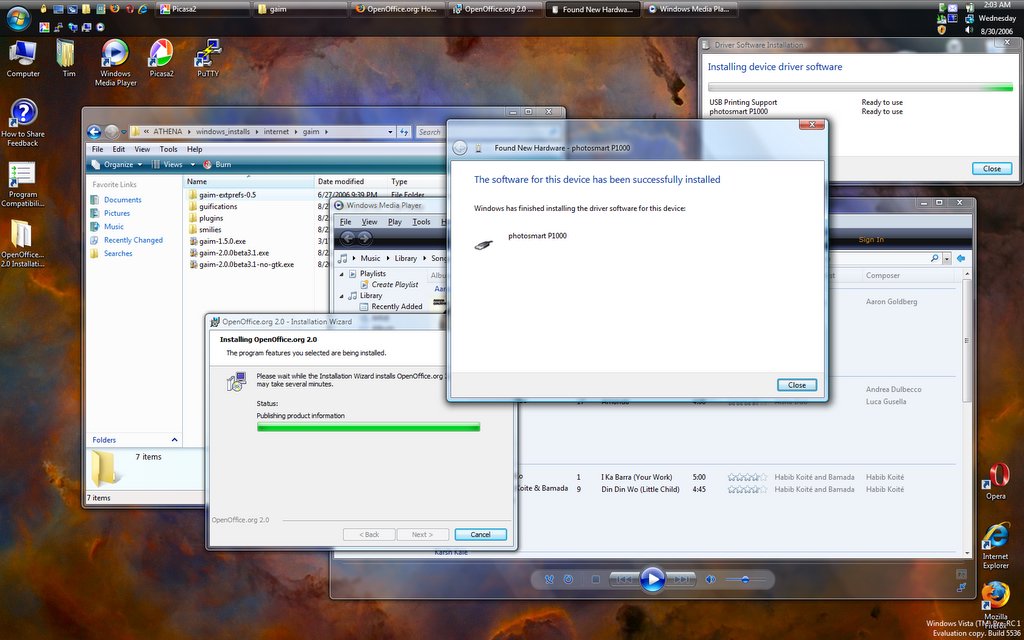
I downloaded and installed the latest and greatest Vista last night. It's supposedly beyond beta, but not quite release canidate material: Pre-RC1. It's a build from the RC1 branch, so it theoretically should be feature-complete, though there might be some more bug fixes that go into RC1. The first big difference I noticed was that my graphics card was recognized and it installed the driver and set up Glass automatically. Ah yes, and that means screen capture is no longer broken.


As you can see, it's trying to install my printer. I was actually able to run the installer for my HP PhotoSmart 1000 (which is no longer supported beyond XP). The install got to the point where it told me to plug in the printer, and I did, but nothing happened, and I ended up having to kill the process. It did leave me with the drivers extracted onto my hard drive, and so I was able to direct the hardware installation wizard to their location, but in the end, the printer still wouldn't install. If I can finally get that working, I might just make the leap to Vista as my primary laptop OS.


This is why you need a fancy graphics card in your computer: new eye-candy features. Alt+Tab still works like before, only now with little previews of the windows, but now there's also Win+Tab. This is the kind of thing graphics cards were made for, and it's nice to see that Windows is finally catching up in this area.


As usual, Firefox and Gaim are among my staple applications. My favorite Gaim plugin, Guifications (which shows little popup messages on certain events) seems to crash Gaim when it tries to display an notification, which is odd, because the same exact setup worked perfectly in Beta 2. I suppose that's what I get for installing a beta version of a plugin on a beta version of an application on a pre-release operating system that's been out in the wild less than 24 hours.

Tuesday, August 22, 2006

Vista Glass

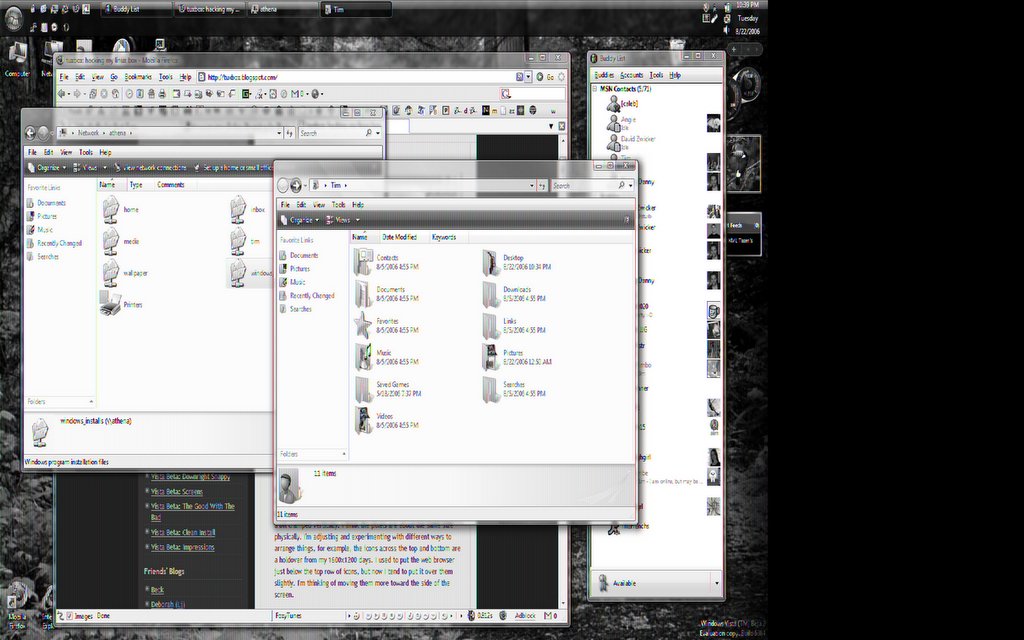
It's so pretty. I wish I could show you what it looks like. I can try, but all I get is this: I decided to do some looking into the nVidia driver situation. I found out that indeed nVidia does indeed have Vista beta drivers for my graphics card, but when I tried to install, it said my card wasn't supported.

Well, I wasn't going to take their word for it, so I did some more digging (or rather googling, since apparently both terms have developed specialized meanings), and found out that what I needed was a modded INF file with the installer, so that it wouldn't reject my card. I found such a file at laptopvideo2go.com, and the driver installed without a hitch.

Finally, I'm running at native resolution, 32-bit color, and using the illusive Aero Glass theme. So far the only thing wrong is that when I try to do a screen capture, the image is garbled as you see above, but trust me, it looks nice. So far the only other hardware issue I've run into head-on with Vista is that my printer, an HP PhotoSmart 1000 does not, and never will work with Vista. The model is no longer supported by HP, so XP is the end of the line. I got it at a thrift store for $3.99 and all it needed was a color cartridge. I don't want to have to part with it just because of an OS upgrade.

Maybe I can hook it up to Athena and I can print over the network. I've never messed with Linux printing. My Bluetooth device (BCM2045) also doesn't have a Vista driver, and there are three "Base System Device" entries in the device manager, which correspond to three of the four functions of my flash card reader. The SD card function works just fine, which is nice, because that's what I use.

Aside from hardware issues, Vista still isn't very stable. The Control Panel keeps crashing whenever I try to open it, and then I have to restart Windows Explorer, which is quite annoying. Another annoyance is when a user program tries to "open file location," i.e., open the folder that contains this file, in stead it opens the file. This happens from Firefox, Picasa2 and Photo Gallery Viewer, so I'm pretty sure it's an OS bug. "Open file location" seems to work fine when right-clicking shortcuts, though.

Wednesday, July 19, 2006

No MacBook Pro for Me

At least not for a while. While I was price-comparing last night, I looked at the 15" Dell with the discounts available to me, and it was such a good deal that I went ahead and bought one. Until yesterday what was keeping me from upgrading my computer was the fact that I was building the house, and I was trying to scrape up enough money to cover closing costs on the loan. It would be nice to be able to mess around with OS X, but that ability it's not worth $1000 to me. For comparison to the Mac, I used the ATI graphics card, but I prefer NVIDIA, since I'm probably going to stick Linux alongside Vista and XP on this thing. Yay for Windows ext3 drivers! Here's the rundown:
E1505 Dual Core Intel Core Duo processor T2500 (2MB Cache/2GHz/667MHz FSB), Genuine Windows XP Media Center Edition 2005
Inspiron E1505Intel Core Duo processor T2500 (2MB Cache/2GHz/667MHz FSB)$2,623.00
LCD Panel15.4 inch UltraSharp Wide Screen SXGA+ Display with TrueLife
Memory2GB Shared Dual Channel DDR2 SDRAM at 533MHZ, 2 DIMM
Video Card256MB NVIDIA GeForceGo 7300 TurboCache
Hard Drive120GB 5400rpm SATA Hard Drive
Operating System (Office software not included)Genuine Windows XP Media Center Edition 2005
Network Card and ModemIntegrated 10/100 Network Card and Modem
Combo/DVD+RW Drives FREE 8X CD/DVD Burner (DVD+/-RW) with double-layer DVD+R write capability
Sound OptionsIntegrated Audio
Wireless Networking CardsIntel PRO 3945 and Dell 355 Bluetooth Internal Wireless Cards
Office Productivity Software (Pre-Installed)Microsoft Office Basic - Includes Word, Excel, and Outlook email
Anti-Virus/Security Suite (Pre-installed)McAfee included with the Starter, Silver, Gold or Platinum Package.
Primary Battery85 WHr 9-cell Lithium Ion Primary Battery
Hardware Warranty3Yr Ltd Warr, At-Home Service, 30Day DOC, PC Training, 2Yr Antivirus Suite
Future Operating SystemsWindows Vista Capable
Operating System Re-Installation CDGenuine Windows XP Media Center 2005 Edition re-installation CD
Media Center EnhancementsTV Tuner w/ Remote Control
SAVE $100 (After mail in rebate) w SILVER BUNDLE which includes 3Yr Limited Warranty, 3Yr At-Home Service, 3 Yr Hardware warranty support, 90 day PC Training, 30 day HelpDesk How-to Assistance, 2Yr McAfee Antivirus Security Suite (Pre - Installed)
Dell EPP/FSS Customers: Save 35% off select Inspiron systems!- $918.05
Boeing employees receive additional 21% discount (before tax, shipping & handling) - $358.04
Subtotal: $1,346.91
Shipping and Handling: $19.99
Shipping Discount: - $19.99
Sales Tax: $118.55
Total: $1,465.46

That price doesn't include the $100 rebate. Anybody else want one? The 21% off is good through July 28th.